
MSUs Are Capable of More Than How They’ve Been Positioned
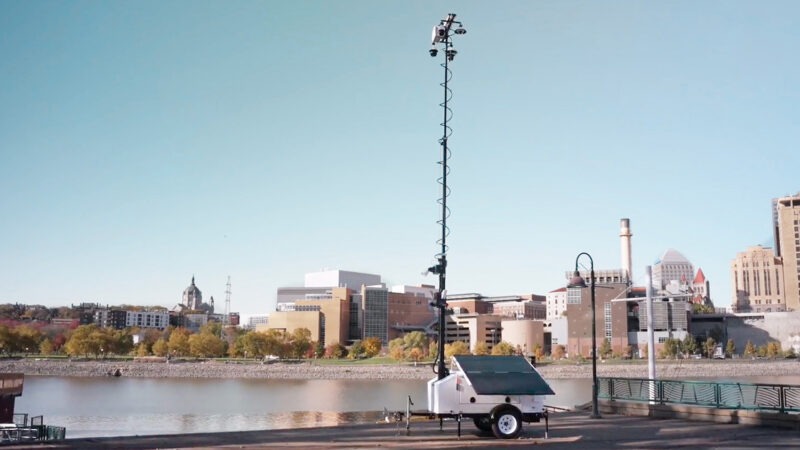
Mobile surveillance units have most often been positioned as a standalone product. Deploy one in a parking lot for deterrence. Rent one for a construction site. Put a tower at a temporary event and return it when the job is done. The unit stands alone — monitored separately, managed separately, and evaluated separately from everything else in a security program.
That positioning shaped how an entire category has been understood. MSUs became something you add alongside your security program, not a part of it. The sophisticated, interconnected stack inside the building is the real security infrastructure. The trailer in the parking lot is something else.
Security follows risk — not the building. Organizations deploying MSUs already understand this at some level: risk doesn’t stay inside the perimeter, and coverage shouldn’t either. That’s the right instinct.
However, following risk effectively requires more than putting a camera where the risk is. It requires that coverage be part of the same security infrastructure responding to it. When an MSU operates in isolation — separate login, separate monitoring, disconnected from your VMS, RTCC, and monitoring center — you have coverage in the right location, but you can’t act on it the way you can with the rest of your security program. You’ve followed the risk geographically. You haven’t followed it operationally.
That gap — between where coverage exists and where it connects — is what standalone MSUs leave behind.
Mobile Pro Systems was built around a different belief about what MSUs can and should be.
What Mobile Surveillance Units Should Be
An MSU isn’t a standalone product. It’s a mobile node — a point of coverage that should feed, integrate with, and extend the security infrastructure you’ve already built. Not a separate system with its own login and its own monitoring workflow. A reliable, trusted extension of the stack your security teams, IT departments, and operations leaders already rely on.
The question MPS asks isn’t “where do we put the trailer?” It’s: what if your existing security stack extended beyond the perimeter?
Not by replacing what you have. Not by asking you to adopt a new platform to manage mobile coverage separately from everything else. By extending your existing infrastructure outward — so the parking lot, the construction site, the temporary event venue, and the remote substation become part of the same security ecosystem as everything inside the building.
That’s what it means for MPS to operate at the mobile edge of the stack you already trust.
Four Ways MPS Embodies This
1. Extends, Not Replaces
Inside your facilities, you’ve already invested in cameras, access control, VMS, and monitoring infrastructure. The goal isn’t to replace any of that — it’s to push the same capability outward.
An MPS trailer deployed in an overflow parking lot doesn’t ask your team to learn new software or manage a separate workflow. It feeds the same monitoring views, the same VMS, the same investigative tools your operators already use. The mobile node becomes part of the ecosystem, not a parallel track that lives outside it.
2. Same Workflows, New Coverage
One of the real costs of treating MSUs as a separate category is operational fragmentation. Every standalone system your team has to manage adds cognitive load, creates siloed evidence, and introduces gaps in situational awareness.
MPS is designed to close that gap, not add to it. Enterprise VMS compatibility, secure connectivity, and encrypted access mean MPS fits within your IT and SOC standards rather than requiring exceptions. The deployment question shouldn’t be “how do we integrate this new system” — it should be “where do we need coverage next?”
3. Open by Design, Partner-Led
MPS specializes in what we do best: trailers, power systems, connectivity, and health monitoring. We don’t try to be the CAD, the RTCC, the analytics engine, and the trailer manufacturer all in one stack.
For ALPR, analytics, monitoring centers, and RTCC tooling, we work with and through proven partners. That’s an intentional choice, not a gap in the product. It means:
- You can keep using whichever ALPR, investigative, and monitoring tools already add value in your environment.
- You can swap or add analytics and monitoring partners over time without changing your mobile hardware fleet.
- You’re not forced into a single vendor’s roadmap for every layer of your security infrastructure.
4. Ecosystem Outcomes, Not Just Endpoints
Adding cameras to a parking lot is a feature. Changing what happens when an incident occurs is an outcome.
MPS deployments are built to deliver the latter. The value shows up across four areas organizations consistently care about:
- Investigations and evidence. MPS units extend coverage to approach routes, lots, alleys, and edges — the places where incidents often originate but rarely have cameras. That footage, tied into your ALPR, RTCC, or records systems, supports case building, nuisance-property actions, and board or council reporting. Camera-supported hotspot interventions in published research consistently show 20–30% reductions in crime or incidents in treated zones when visibility and certainty of detection increase.
- Response and dispatch. When mobile units feed existing CAD, RTCC, or monitoring center views, supervisors see conditions before committing units. That’s a safety and efficiency outcome that depends on your MPS units being actual nodes in the ecosystem your dispatch and RTCC teams already trust.
- Risk, compliance, and documentation. For critical infrastructure, utilities, and high-liability sites, continuous coverage of yard edges, contractor zones, and temporary staging areas feeds directly into the compliance and insurance documentation workflows you already run. You’re not building a new audit trail — you’re extending the existing one.
- Program ROI and reuse. Trailers rotate across hotspots, events, and critical sites, reusing the same integrations and workflows across multiple missions. The integration work you do once pays dividends every time you redeploy.
MP Status: The Operational Layer That Makes It Real
Treating MSUs as mobile nodes in your existing security ecosystem is a design philosophy. MP Status is what makes it operationally real.
MP Status is the continuous monitoring, management, and integration layer across your MPS fleet. It tracks the health of every unit in real time — communication status, power levels, and confirmed positioning — so your security program can depend on mobile infrastructure the way it depends on fixed cameras. Your team isn’t separately managing a standalone system to verify that units are working. MP Status is doing that continuously, surfacing what needs attention and confirming what’s functioning, so the rest of your stack can treat those units as trusted nodes without reservation.
Three things become certain when MP Status is in place:
- Communication. Every unit’s connectivity is continuously tracked — you know what’s online, what’s feeding your systems, and what needs attention before an incident makes that question urgent.
- Power. MP Status monitors power status across your fleet so units are operational when and where you need them — overnight deterrence, a weekend event, or a months-long critical infrastructure deployment.
- Location. GPS-confirmed positioning means your deployment matches your plan. The coverage you mapped is the coverage you have.
When those three things are certain across your fleet, your existing VMS, RTCC, and monitoring center can treat mobile units the way they treat fixed cameras — as reliable, trusted nodes in the infrastructure.
MP Status also enables automation: configuring how mobile units interact with other systems, how alerts are routed, and how fleet behavior adapts to mission requirements. This is where the connective tissue concept becomes active rather than passive — not just visibility into your fleet, but the ability to orchestrate how your mobile infrastructure integrates with everything around it.
What “Integration-First” Actually Means: A Buyer’s Checklist
If you’re evaluating mobile surveillance options — from MPS or any other vendor — these are the questions that determine whether a provider is truly integration-friendly or just another standalone product with an API attached:
Does this extend the stack I already trust, or does it add another standalone system I have to manage separately?
- Where does your video and data ultimately live? Is it accessible through your existing VMS and investigative tools, or does it require a separate platform to be useful?
- How much custom development does “open API” require? APIs that exist on paper but require significant IT investment to make functional are, in practice, not open.
- Can you mix and match best-in-class tools? Can you use best-in-class ALPR, your existing monitoring center for video, and MPS for mobile infrastructure — or does the vendor require you to use their versions of each layer?
Talk to Our Team
See how MPS trailers, connectivity, power systems, and MP Status fleet monitoring work together to become trusted mobile nodes in your existing VMS, RTCC, monitoring, and investigative ecosystem.